9:16 Vertical Subtitle Safe Zones for TikTok Shop & Micro-Drama Clips
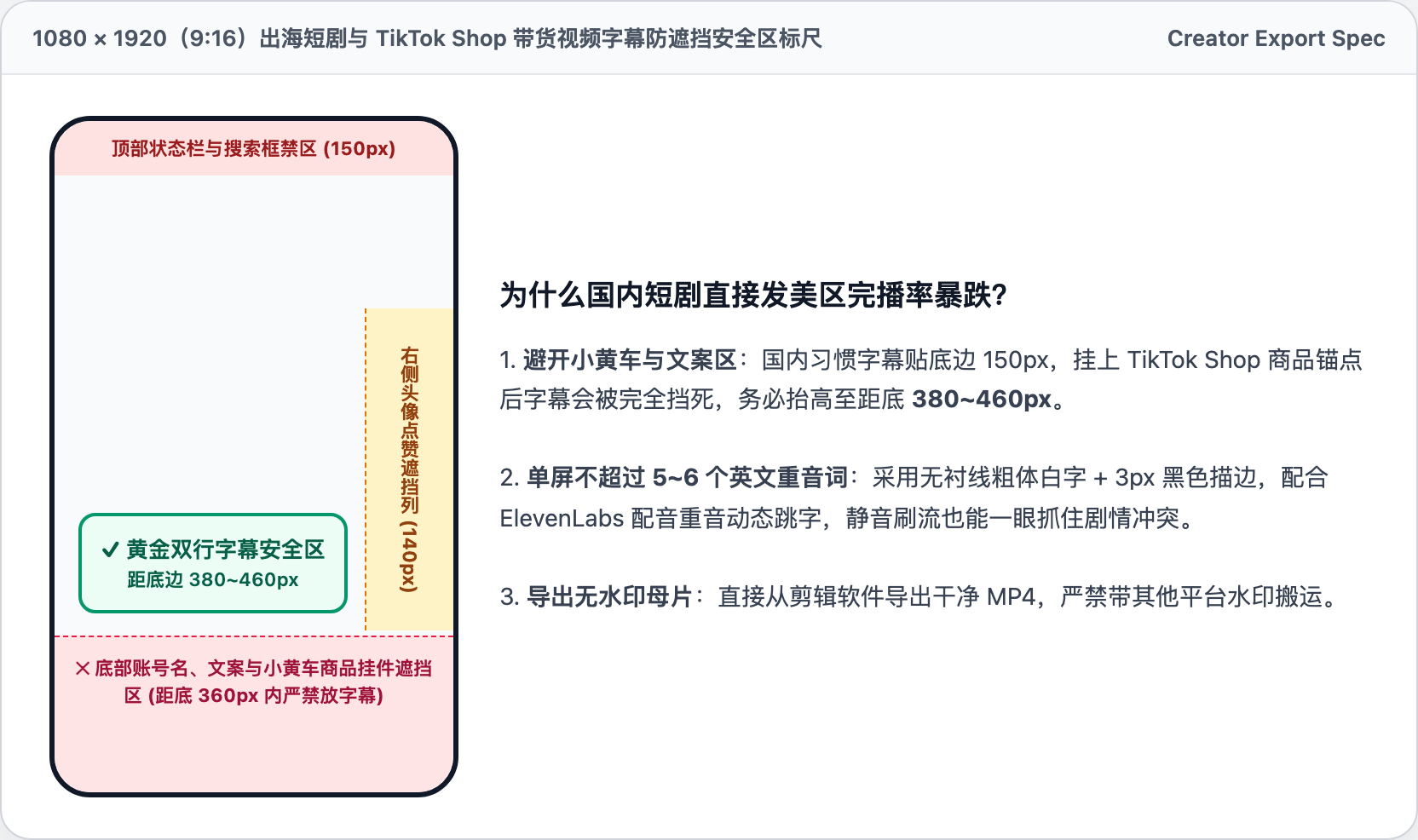
1. 2026 Safe-Zone Margins: 380px Bottom & 160px Right
Bottom-anchored captions collide directly with TikTok Shop product cards, descriptions, and right-rail engagement buttons. On a 1080×1920 timeline, keep all dialogue captions at least 380px above the bottom edge (380–460px sweet spot) and 160px clear of the right edge.
Save a reusable safe-zone guide overlay in CapCut, Premiere, or DaVinci Resolve so every short-drama episode and UGC product cut exports with identical clearance.
2. Font Size & Stroke Specs for Silent Scrollers
Use 56–68px bold geometric sans-serif typography (such as Montserrat Bold or Inter Bold) at 1.25 line height, keeping each card to 4–6 emphasized words synced to voiceover beats.
Apply a crisp 4–6px solid black outer stroke (or a 65% opacity dark pill background) so high-contrast white captions remain legible over bright highlights and fast cuts.
Studio utilities: AIDePath IP Check ↗ · HelloPost ZIP & SIM ↗ · ZebraLink Dedicated Line ↗